Conference Photography: The Complete Guide to Corporate Event Photography
Conference photography requires capturing 3,000–7,000 images per event across keynotes, breakout sessions, networking, and expo floors. AI culling tools like FilterPixel let corporate event photographers sort thousands of photos in minutes, enabling same-day gallery delivery that sponsors and organizers increasingly demand.
Shot lists, pricing, professional tips, and the AI-powered workflow that lets corporate event photographers deliver same-day galleries without the 8-hour culling session.
No credit card required
What Is Conference Photography and Why It's One of the Most Lucrative Niches
Conference photography is the professional documentation of corporate events from multi-day industry summits and trade shows to company all-hands, product launches, and association gatherings. The corporate event photographer captures keynote speakers, panel discussions, networking interactions, sponsor activations, and candid delegate moments that organizations use across their marketing, PR, and internal communications.
Unlike wedding or portrait photography, conference photography operates on a B2B model: you are hired by event organizers, corporate marketing teams, PR agencies, or associations, clients who book recurring events, pay on net-30 terms, and refer you to their professional networks. A single happy corporate client can be worth $20,000–$50,000 in lifetime bookings.
Why Corporate Event Photography Is a High-Value Niche
The demand for professional conference photography has grown steadily alongside the events industry. Here is why it remains one of the most financially rewarding specializations for commercial photographers:
The trade-off for these premiums is volume and speed. A typical full-day conference produces 800–2,000 raw frames. Clients increasingly expect same-day social media previews and full galleries within 72 hours. This is where workflow efficiency & particularly the culling stage, becomes the defining factor between a profitable conference photography business and an exhausting one.
The volume problem: A photographer shooting a 3-day corporate summit can return home with 5,000–7,000 raw images. At 2 seconds per frame in manual culling, that is over 3 hours of culling alone — before editing even begins. Tools like FilterPixel cut this to minutes using AI.
The Essential Conference Photography Shot List
Every conference is different, but the most successful corporate event photographers work from a proven shot list that ensures comprehensive coverage across five core categories. Share this with your client before the event to align on expectations.
- Venue exterior with signage or marquee
- Registration and welcome desk setup
- Main stage with event branding in frame
- Signage, banners, and sponsor walls
- Room overview before attendees arrive
- Pre-event lighting and AV setup
- Conference swag, programs, or materials
- Detail shots of branded items and displays
- Speaker introduction and walk-out moment
- Wide establishing shot of stage and screen
- Medium shot: speaker and presentation slide
- Tight close-up on speaker's face and gesture
- Speaker from the audience perspective (low angle)
- Slide content with speaker in foreground
- Applause and standing ovation moments
- Speaker handshake or introduction interaction
- Full panel wide shot with all speakers visible
- Individual speaker tight shots while speaking
- Moderator interacting with panelists
- Active listening shots of non-speaking panelists
- Name placard with speaker for identification
- Audience from stage perspective (if permitted)
- Q&A microphone pass and audience question moments
- Panel wrap, group handshake or thank-you
- Attendees mingling in hallways and lounges
- Natural conversation moments (2–3 people)
- Business card and contact exchanges
- Sponsor booth interactions and demos
- Coffee break / refreshment station candids
- Workshop or breakout session activity
- Attendees engaged with exhibition displays
- Laughter and energy shots & positive emotions
- Clean background headshot (2–3 expressions)
- Environmental portrait at venue / stage
- Speaker with event branding visible
- Half-body / three-quarter professional pose
- Candid working shot (reviewing notes, etc.)
- Speaker on stage pre-event setup (editorial)
- Award announcement moment (presenter and screen)
- Winner receiving award — handshake + trophy
- Winner's reaction and audience applause
- Posed group photo of all award winners
- Department or team group photos
- VIP group or executive board photo
- Full delegate group shot (if requested)
- Closing ceremony and sign-off moment
Before the Conference: Pre-Event Shot List Coordination
Send your shot list to the event organizer 5–7 days before the event. Request a printed schedule with speaker names, session times, and room locations. Identify the VIP shots that are non-negotiable, typically the keynote opener, any award ceremonies, and the executive group photo, and plan your position accordingly. Pre-event walkthroughs of the venue are invaluable for understanding light conditions and identifying the best camera positions before sessions begin.
The Shot List You Should Never Miss
Among all conference photos, these five images are consistently the most requested by clients and the most widely used in their marketing materials:
- The keynote wide shot — speaker on stage with the full event branding and audience visible. Used in press releases, annual reports, and social posts.
- The energized networking candid — two or three people in genuine conversation. Used in event recap emails and membership promotion.
- The speaker close-up with emotion — mid-sentence, gesturing, or reacting. Used on speaker promotion pages and LinkedIn.
- The full-room overview — showing scale and attendance. Used in bid documents for next year's event venue.
- The award or recognition moment — the handshake, the smile, the trophy. Used in internal communications and winner announcements.
Conference Photography Pricing Guide
Pricing conference photography correctly is a balance of day rate, deliverables, and usage rights. These ranges reflect 2025–2026 market rates across major markets. Adjust upward for same-day delivery, expanded licensing, or international travel.
- 1 camera body, standard zoom
- Basic color-correct editing
- Online gallery delivery (5–7 days)
- Personal & social media license
- No travel or accommodation included
- 2 camera bodies with multiple lenses
- Professional color grade + retouching
- Gallery delivery within 3 business days
- 24-hr social media preview (20–30 selects)
- Commercial license for marketing use
- Licensed for print and digital media
- Lead photographer + second shooter
- Same-day highlight gallery delivery
- Full resolution + web-optimized exports
- Extended commercial licensing
- Event recap video stills package
- Dedicated post-processing support
Conference Photography Deliverables Breakdown
When pricing conference photography packages, clearly define each deliverable. Scope creep is the biggest threat to your margins in corporate event photography. Here is what clients typically expect at each tier:
Common Conference Photography Add-Ons
- Same-day delivery premium: $300–$800 to guarantee 20–50 edited images delivered by end of event day.
- Second shooter: $400–$800 per day for an associate photographer covering breakout rooms or alternate angles.
- Conference headshot station: $500–$1,500 for a dedicated portrait setup where attendees queue for a quick headshot during breaks.
- Video b-roll package: $800–$2,000 for short-form video clips to complement the still photography deliverable.
- Rush editing: 50% premium on base rate for galleries delivered within 24 hours of event completion.
- Usage rights expansion: 20–30% premium for advertising, broadcast, or international distribution rights.
How to Quote Multi-Day Conferences
Most conference photographers apply a discount of 10–15% on the third day and beyond for multi-day bookings, reflecting the reduced setup and travel overhead. However, if a multi-day event requires same-day delivery or a second shooter each day, do not discount — the operational complexity warrants your full day rate.
Pricing tip: Quote conference photography packages, not hours. Hourly billing creates constant client anxiety about time and limits your earning potential. A package that defines deliverables, licensing, and timelines protects both parties and positions you as a professional, not a contractor.
Conference Photography Tips from the Field
Technical competence gets you in the room. These 10 professional tips separate conference photographers who get called back from those who do not.
The Conference Photographer's Complete Workflow
From the first frame at registration to the delivered gallery in your client's inbox, a repeatable process that scales to any conference size.
Pre-Event Preparation
Confirm schedule, room layout, and key shot list with the event organizer. Visit the venue if possible, or request floor plans. Charge all batteries, format cards, and ensure redundant storage. Prepare a backup camera body. Conference photographers cannot afford equipment failure with no backup. Brief any second shooters on priorities.
1–3 days before eventOn-Site Shoot
Arrive 90 minutes early for setup and a venue walk-through. Shoot in RAW format at all times. Work systematically through your shot list by session. Capture generously during peak moments like keynote entrances, award announcements, networking energy. Then, back up to a second card simultaneously if your camera supports dual-slot recording. Keep an eye on card capacity throughout the day.
Event day — full coverageIngest & Backup
Immediately after the event, ingest all cards to your primary drive and create a full backup to a second drive. Never format cards until both copies are confirmed. Organize files by session or time block to make the culling and editing process easier. For multi-day conferences, perform this process each evening.
Same day — within 2 hours of wrapAI Culling with FilterPixel
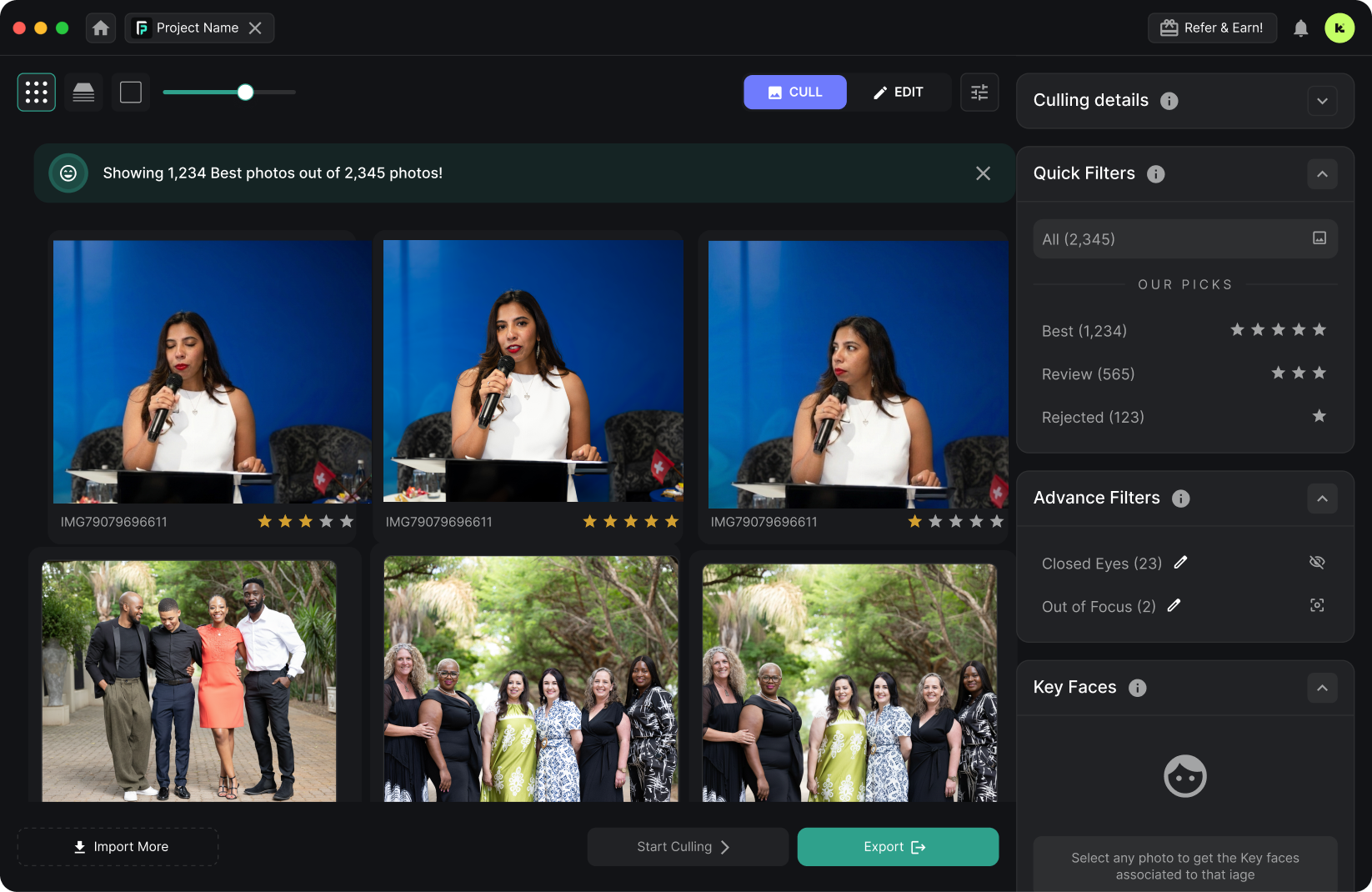
Upload your full RAW shoot to FilterPixel's cloud culling engine. Within minutes — not hours & FilterPixel's AI identifies the best frames across your entire shoot: high impact expressions of speakers, technically sharp images, well-composed shots, strong expressions, and duplicates, closed eyes, flash misfires flagged for rejection. What would take 3–5 hours of manual culling in Lightroom is completed in under 3 minutes on average. Review the AI's picks and finalize your selects with a rapid second pass.
FilterPixel — avg. 3 minutesEdit & Color Grade
Import FilterPixel's selects into Lightroom or Capture One. Apply your base preset, then work through exposure corrections, white balance normalization (essential in mixed conference lighting), and any targeted adjustments. Conference photography editing should be clean and natural — clients use these images for press and marketing, not art direction. Aim for consistency across the full gallery.
1–3 hours depending on volumeExport & Quality Review
Export your final selects. Do a final QC pass: check for any images with closed eyes on speakers, motion blur on key shots, or exposure issues that made it through. This 15-minute step prevents embarrassing client requests for re-edits.
30–45 minutesDeliver & Follow Up
Upload to your delivery platform, Pixieset, ShootProof, or a branded client portal. Send the client a delivery email with download instructions, usage rights recap, and a note on your archive policy. Follow up 2 weeks after delivery to ask how the images are being used. This follow-up touchpoint is when next year's booking conversation often begins.
Within 3–5 business daysWhy Conference Photographers Need AI Culling
Conference photography produces more images per engagement than almost any other genre. The volume is not optional & it is the nature of the work. Managing that volume without AI culling is the single biggest constraint on conference photographer profitability.
- 3–6 hours culling 1,500 frames from a single conference day
- Same-day delivery is physically impossible after a full shoot day
- Mental fatigue leads to inconsistent selection quality
- Multi-day conferences create a massive backlog before editing begins
- Rush culling causes good images to be missed and weak ones included
- Post-processing bottleneck limits how many events you can take
- Late deliveries damage client relationships and reduce repeat bookings
- 1,500 frames analyzed and sorted in under 3 minutes on average
- Same-day social preview gallery to ship to your client.
- AI-genre based selection criteria applied across every frame
- Multi-day conference backlogs cleared overnight automatically
- Best shots, sharpest frames, and duplicate detection handled by AI
- Take more bookings with same quality, fraction of the post-processing time
- Deliver in 24–48 hours and become the conference photographer clients recommend
How FilterPixel Works for Conference Photography
FilterPixel's AI engine is trained on millions of professional photographs across event, portrait, and documentary genres. For conference photography, it identifies technically superior frames with sharp focus, correct exposure, open eyes, strong composition — and flags duplicates, blurs, and redundant sequences automatically.
- Upload your full RAW shoot via cloud or desktop app
- AI analyzes sharpness, exposure, composition, and expressions
- Duplicates and near-duplicates flagged for rejection in seconds
- Best frames across keynotes, panels, and networking auto-selected
- Review and refine AI picks with a single-pass human review
- Export selects directly to Lightroom or Capture One
No credit card required
"I shoot 3–4 corporate conferences a month. FilterPixel turned a 4-hour culling session into 15 minutes. I now offer same-day previews to every client as standard — it has helped me raise my rates 25%."
"We cover 2-day industry summits with 1,800+ frames per day. Manually culling used to push our delivery to 10 days. With FilterPixel, we are delivering within 48 hours."
"The expression detection is what makes FilterPixel so valuable for conference work. It finds the speaker mid-gesture, eyes open, perfectly exposed, out of 2,000 frames. My reject rate went from 72% to 18% rework."
Frequently Asked Questions
Answers to the questions event organizers and photographers ask most.
Conference photography typically ranges from $1,500 to $5,000 per day depending on the photographer's experience, the complexity of the event, the deliverables required, and the market. Half-day rates run $800–$2,500. Multi-day conferences often receive a 10–15% discount on the total package for days three and beyond. Add-ons like same-day delivery, a second shooter, or a headshot station will increase the investment.
Always request an itemized quote that clearly separates the day rate from deliverables, licensing, and travel.
A typical full-day conference produces 200–500 final edited images for delivery. Photographers generally shoot 800–2,000 raw frames per day, then cull them down to the strongest selects before editing. The final edited count depends on the number of sessions, the variety of activities, and any agreed-upon minimum delivery count in the contract. AI culling tools like FilterPixel dramatically speed up the selection process without sacrificing quality.
Essential gear for professional conference photography includes: a full-frame camera body (two bodies strongly recommended for reliability), a fast 24–70mm f/2.8 zoom for versatile coverage, a 70–200mm f/2.8 telephoto for stage compression and speaker close-ups, a wide-angle lens (16–35mm) for venue overviews and large group shots, an off-camera or on-camera flash with bounce capability for networking spaces, multiple batteries (plan for 1,500–2,000 shots per battery), and high-capacity fast memory cards with a second backup card slot active. A monopod is useful for long keynote sessions.
Industry expectations have shifted significantly in recent years. Many corporate clients now expect a social media preview gallery of 20–50 images within 24 hours of the event ending & particularly for use in live social coverage and next-day wrap-up posts. Full gallery delivery is typically 3–7 business days, with premium packages offering 24–48 hour turnaround. Same-day delivery of highlight images is increasingly requested and commands a premium of $300–$800. Photographers who can reliably deliver same-day previews and rapid final galleries have a significant competitive advantage in the corporate market.
For conference photography, use Auto ISO (capped at 6400–12800 depending on your camera's noise performance) to handle the rapidly changing light conditions, particularly the mix of stage lighting, ambient room light, and projector backlight. Set a minimum shutter speed of 1/250s to freeze motion and prevent blur from handheld shooting during active sessions. Use f/2.8 in low-light ballroom or theater environments, and f/5.6–f/8 for panel discussions where you need multiple speakers in focus simultaneously. Shoot RAW at all times for maximum flexibility in post-processing. Enable Eye AF if your camera supports it & it makes speaker portrait shots significantly more reliable in fast-changing lighting environments.
A professional conference photography contract should include: the event date, location, and full schedule of coverage; the photographer's day rate and a detailed list of deliverables (image count, file format, delivery timeframe); usage licensing terms specifying exactly how the client may use the images; cancellation and postponement terms with deposit structure; payment schedule (typically 50% deposit to secure the date, 50% on delivery); any add-ons or extras with pricing; travel and accommodation reimbursement terms if applicable; and a clause addressing what happens if the photographer is incapacitated or the event is cancelled. Always use a written contract, a verbal agreement is insufficient for commercial work.
FilterPixel's AI culling engine is particularly valuable for conference photographers because of the volume of images produced per event. After uploading your full RAW shoot, FilterPixel analyzes every frame for technical quality (sharpness, exposure, focus accuracy), subjective qualitity specific to conference shots using its Deep Cull Technology, expression quality (open eyes, strong facial expression on speakers), and duplication, flagging near-identical consecutive frames automatically. What would take 3–6 hours of manual culling in Lightroom is typically completed in under 3 minutes. This enables conference photographers to offer same-day preview galleries as a standard service, meet rapid delivery deadlines, and take on more bookings without the post-processing bottleneck that limits most event photographers. Over 14,000 photographers use FilterPixel, with an average rating of 4.9/5.
In most cases, the event organizer or client who has hired you is responsible for ensuring you have the right to photograph at the venue. Request a vendor credential or press pass from the organizer before the event — this gives you access to all areas and protects you if venue security questions your presence. For conferences in hotel ballrooms or convention centers, the organizer's event contract with the venue typically covers hired photographers. If you are being hired directly by a venue rather than an organizer, ask specifically whether commercial photography requires a separate venue permit or release form.