Event Photography Workflow:
From Shoot to Delivery
in Record Time
A practical, step-by-step guide for concert, festival, corporate, and gala photographers. Cut your post-shoot time in half without sacrificing quality.
No credit card required
The Modern Event Photography Workflow
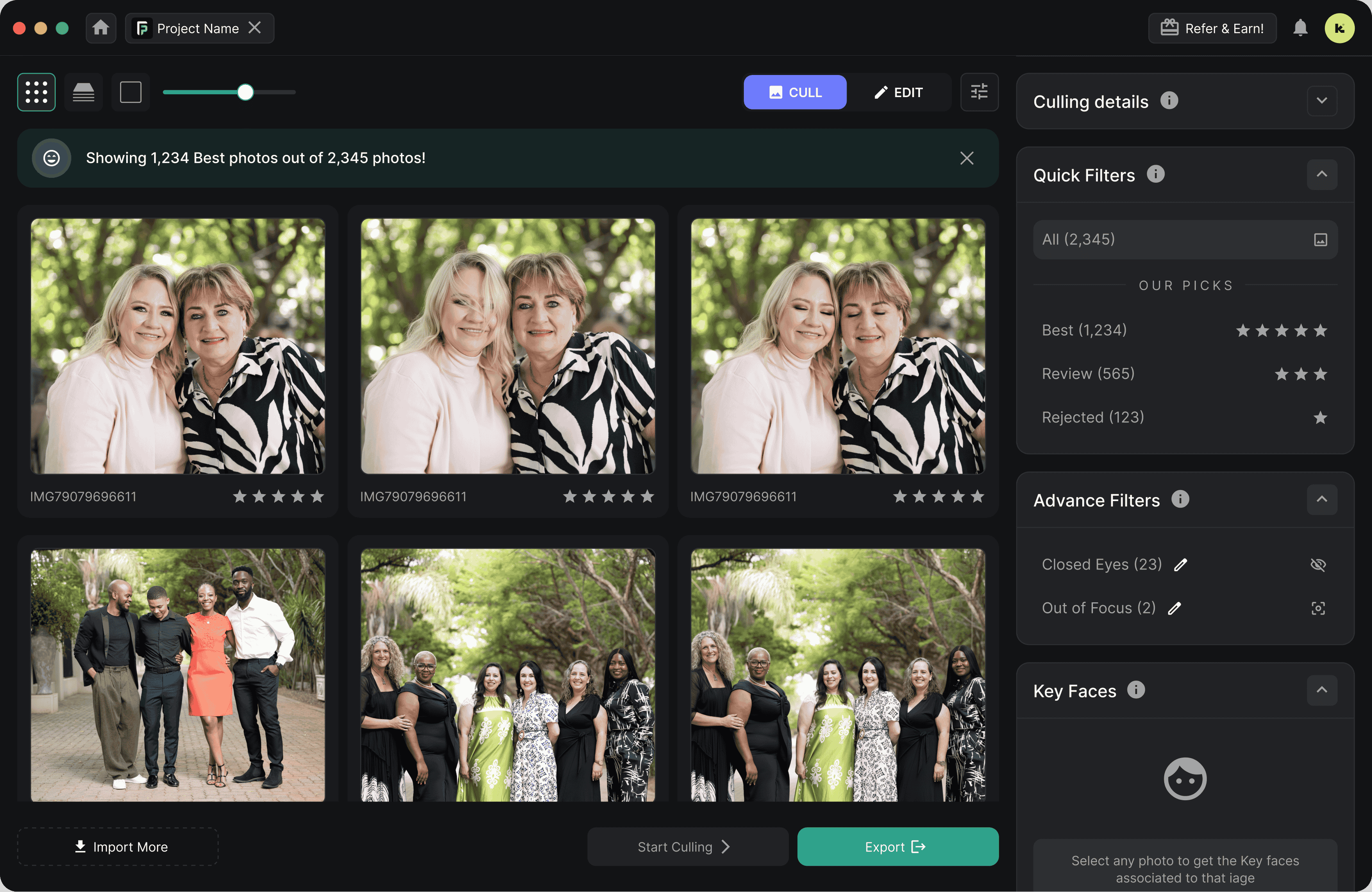
The best event photographers don't just shoot well they run a tight post-production process. Here is every stage of a professional workflow, from the moment you walk into the venue to the moment the gallery link lands in the client's inbox.
Pre-Event Preparation
Preparation is invisible when it goes right and catastrophic when it doesn't. A clean pre-event checklist takes 20 minutes and saves hours of post-production pain.
- Scout the venue or review venue photos — note lighting conditions, backgrounds, and restrictions
- Confirm shot list and key moments with the client or event planner
- Format all memory cards and charge every battery
- Set up FilterPixel account and test upload speed at home
- Pack a laptop or iPad for on-site ingestion during breaks
- Agree on a delivery timeline with the client before you shoot
Shoot and Capture
Smart shooting discipline reduces post-processing load dramatically. The goal isn't fewer photos — it's fewer bad photos.
- Always shoot RAW (or RAW + JPEG for quick previews)
- Enable dual card slot recording for automatic backup on-camera
- Use eye-tracking or subject-detection autofocus for moving subjects
- Raise your minimum shutter speed — motion blur is the #1 reject reason at events
- Shoot in bursts at critical moments (first dance, stage performance, award presentations)
- Delete obvious misfires in-camera during lulls — not obsessively, just the truly hopeless frames
Ingest and Backup During the Event
This is the step most event photographers skip — and the one that compresses your delivery timeline the most. Don't wait until you're home to start transferring cards.
- Transfer full cards during natural breaks (meal service, between sets, ceremony interlude)
- Copy to laptop and a portable drive simultaneously
- Begin uploading to FilterPixel cloud as soon as the first card dumps
- Keep shooting on remaining cards while the upload runs in the background
AI Culling with FilterPixel
FilterPixel analyzes every image for technical quality signals — sharpness, focus accuracy, exposure, blink detection, and near-duplicate grouping. The AI scores each frame and surfaces the best images automatically.
- Uploads process at approximately 3 minutes per 1,000 images
- AI assigns a quality score to every RAW file
- Blink detection automatically flags closed-eye frames
- Burst deduplication selects the sharpest frame from each sequence
- Adjustable acceptance threshold — set it stricter for edgy editorial, looser for full-coverage documentary
Review and Human Sign-Off
AI culling handles the heavy lifting. Your review pass is about context and story — making sure every key moment is represented and no critical frame was left behind.
- Review the AI-selected gallery in FilterPixel's web interface
- Rescue any story-critical frames the AI scored low (unusual angle, key guest, decisive moment)
- Confirm key moments coverage: arrivals, performances, speeches, details, candids
- Final cull from selects should take 20–40 minutes for a 2,000-image event shoot
Edit in Lightroom or Capture One
You've culled ruthlessly. Now edit efficiently. With a well-defined event preset and batch sync, editing 400 selects from a 4-hour event should take 60–90 minutes, not 5 hours.
- Apply a base event preset to all selects in one click
- Group by lighting condition and sync settings across groups
- Spot-check white balance on venue transition shots (indoor to outdoor, stage lighting to ambient)
- Batch export with sharpening appropriate for web or print delivery
Export and Deliver
Delivery is the client's first impression of your final work. Make it polished and fast.
- Export at agreed resolution (typically 2048px long edge for web galleries, full size for print)
- Upload to a branded client gallery (Pic-Time, Pixieset, Cloudspot, or similar)
- Send gallery link with a personal note — not just an automated email
- Include download instructions and print ordering information
- Archive RAW selects and rejected frames to cold storage
Workflow Adjustments for Each Event Type
The core seven-step workflow applies everywhere. But concerts, festivals, corporate events, and galas each have specific challenges that require targeted workflow adjustments.
Concert Photography Workflow
Concerts present the most technically demanding conditions in event photography: extreme contrast between stage lighting and crowd darkness, fast-moving subjects, and strict time limits (often just the first three songs). Your workflow must be built around shooting speed and AI culling efficiency.
- Shoot in Manual or Tv priority lock shutter at 1/640s minimum
- Auto ISO with ceiling (typically 8000–12800 on modern bodies)
- Shoot bursts of 5–8 frames on every strong moment; the AI will pick the sharpest
- Ingest cards between sets or immediately post-show
- FilterPixel's burst deduplication handles the 80% near-identical frames automatically
- Edit with a high-contrast, saturated preset that complements stage lighting
- Deliver to media clients within 2–4 hours of set end (sometimes within 30 minutes for live news use)
Concert Workflow at a Glance
Festival Photography Workflow
Music and arts festivals mean multi-day shoots, thousands of images per day, and often multiple stages to cover simultaneously. The volume alone makes AI culling non-negotiable but the workflow complexity requires disciplined organization from day one.
- Create a folder structure by day, stage, and artist before the festival starts
- Ingest by artist set, never let cards accumulate overnight
- Upload to FilterPixel per-set or per-day; process as you go
- Use FilterPixel's customizable scoring to prioritize crowd reaction and candid energy shots
- Maintain a running "hero shots" album updated throughout the festival
- Deliver highlight set to social media clients same-day; full gallery within 48–72 hours
- Archive by day to external drives every evening
Festival Workflow at a Glance
Corporate Event Photography Workflow
Corporate events are deadline-driven. Marketing teams need photos for recap posts within hours of the event ending. A fast workflow is a competitive advantage that justifies premium pricing and earns repeat bookings.
- Get a shot list from the marketing or events team before the day
- Shoot clean, consistent compositions — corporate clients prefer polished over gritty
- Ingest during lunch or between sessions on a laptop in the venue
- AI cull during the afternoon sessions while you shoot the morning batch
- Maintain a consistent color grade across all images — corporate decks need uniformity
- Send a "highlights" set (20–30 images) within 1–2 hours of event end for immediate social use
- Deliver full edited gallery by following morning
Corporate Workflow at a Glance
Gala and Awards Ceremony Workflow
Galas and awards events mix formal posed moments (group shots, award presentations) with candid reception coverage. The challenge is volume paired with VIP expectations, every guest expects to be flattered in the photos.
- Use a second shooter to cover the room while you handle posed award moments
- AI culling is especially valuable here : blink detection catches closed eyes in group shots automatically
- Sort by moment type post-cull: arrivals, cocktail candids, dinner, awards, dancing
- Apply face-aware retouching in Lightroom's AI masking to speed up skin editing
- Deliver a VIP preview set (organizers, key awardees) within 24 hours
- Full gallery delivery within 48–72 hours
Gala Workflow at a Glance
Why Culling Takes the Longest and Kills Profitability
Ask any event photographer where their workflow breaks down and they'll say the same thing: culling. It's the most time-consuming, most repetitive, and least billable part of the job.
Where Your Post-Event Hours Go
For a typical 4-hour event with 2,000 captures, here is where a traditional workflow spends its time. Notice that culling alone accounts for more time than editing.
The real cost: At a modest rate of $75/hour, 4 hours of culling costs you $300 in unbillable time — per event. For a photographer doing 60 events per year, that's $18,000 in lost productive hours.
Why Culling Is So Hard at Events
Event photographers routinely shoot 500–1,000 frames per hour of coverage. Reviewing each image manually for even 2 seconds means hours at the keyboard.
Concerts and key moments produce 10–30 near-identical frames that must be compared one by one to find the sharpest version. This is exactly what AI excels at.
After reviewing 500 images, your judgment degrades. Studies on decision fatigue show that quality drops sharply after 30–45 minutes of repetitive review tasks.
The industry delivery window has tightened. Corporate clients now expect same-day highlights. A 3-day turnaround that was standard in 2018 is a liability in 2026.
How AI Culling Transforms the Event Photography Workflow
AI photo culling doesn't replace your eye, it eliminates the decision volume that exhausts it. Here's exactly what FilterPixel's AI handles automatically, and how it changes the post-event experience.
Cloud Cull During the Event Not After It
The biggest workflow unlock isn't just faster culling, it's when you cull. With FilterPixel's cloud processing, culling begins while the event is still happening. Here's the exact integration flow.
"I photographed a 3-day music festival and delivered the full gallery within 18 hours of the final set. The promoter said it was the fastest turnaround they'd ever seen. That's now my selling point."
"I used to come home from corporate events and spend the entire next day culling. Now I'm done with culling before I leave the parking lot. I deliver the highlights that same night."
"The blink detection alone is worth it for gala work. I used to spend 40 minutes just checking every group shot for closed eyes. FilterPixel flags them all automatically."
Traditional vs. AI-Powered Event Workflow
A real-world comparison for a 4-hour corporate event with 2,000 RAW captures and a 200-image final delivery.
* AI culling can run during the event itself, so effective post-event time is even lower. Times based on 2,000 RAW image input, 200 final selects.
Feature Comparison
| Feature | Manual Culling | FilterPixel AI |
|---|---|---|
| Process 1,000 images | 60–90 min | ~3 minutes |
| Blink and closed-eye detection | ✕ Manual check | ✓ Automatic |
| Burst duplicate removal | ✕ Frame-by-frame review | ✓ AI selects best |
| Works while you shoot | ✕ Requires your attention | ✓ Cloud runs async |
| Consistent quality scoring | ✕ Affected by fatigue | ✓ Always consistent |
| RAW file support | ✓ | ✓ All major brands |
| Lightroom integration | ✓ | ✓ Ratings synced |
| Adjustable sensitivity | Partial (your subjective threshold) | ✓ Slider control |
| Scales to 10,000+ images | ✕ Exhausting | ✓ Same speed |
Pro Tips for Each Event Type
Proven techniques from photographers who shoot high-volume events regularly — covering both on-site execution and post-production efficiency.
- Always shoot bursts of 5–8 frames on peak performance moments. The AI picks the sharpest. You don't have to compare each one.
- Avoid using flash (it's usually prohibited and changes the mood). Push ISO and let the AI identify the least-noisy frames.
- Label cards by artist set name before dumping. Organized ingestion = organized FilterPixel batches = no confusion during review.
- Deliver 2–5 hero images to social clients within 60 minutes of the set, while uploading the full batch to FilterPixel in the background.
- Never leave more than one card's worth of images un-ingested at any time. Volume compounds a 3-day festival becomes overwhelming if you wait until day 3 to start.
- Use folder naming convention: YYYYMMDD_ArtistName_Stage (e.g., 20260305_BlueOcean_MainStage). This makes post-cull organization instant.
- Set FilterPixel to run each batch immediately on upload — don't queue 10,000 images at once at the end of the festival.
- Build a "social highlights" Lightroom collection during the festival. Drag in any selects that feel like standouts as you review FilterPixel results.
- Shoot tethered to a laptop at the primary speaking location & this also makes same-day delivery of keynote images effortless.
- Keep a corporate preset that's conservative and clean & slightly warm, lifted shadows, neutral skin. Apply it as your starting point for all images.
- Deliver a curated "social set" (15–25 images) via a shared Dropbox link within 90 minutes of the event ending. Then send the full gallery next morning.
- Track your turnaround time per event and use it in your pitch materials. "Same-day social delivery" is a concrete selling point that justifies premium pricing.
- Create a dedicated "VIP" folder during the shoot & flag images of key speakers, board members, and award winners on-camera for fast retrieval during review.
- For group shots, shoot 5–8 frames minimum. FilterPixel's blink detection will identify the cleanest frame, but having volume increases the chance of a perfect shot.
- Send a VIP preview (photos of key individuals) to the organizer within 24 hours. This earns goodwill that translates directly to repeat bookings.
- Separate your edit into: (1) people and portraits, (2) details and decor, (3) candid atmosphere. This makes category browsing easy for clients ordering prints.
Universal Event Workflow Tips
Label each card physically (tape + marker) with the event name and slot number before you shoot. When you're juggling 6 cards at an all-day festival, this prevents catastrophic mix-ups.
Save gallery email templates, preset export settings, and client delivery emails as reusable templates. Delivery admin should take under 10 minutes once editing is done.
AI culling handles technical quality. Your review pass should happen on a properly calibrated display so your color and exposure decisions translate correctly to the client's screen.
Frequently Asked Questions
A professional event photography workflow from card dump to client delivery typically takes 4–12 hours for a 4-hour event, depending on image volume and editing complexity. With AI culling, the culling phase alone drops from 3–5 hours to under 30 minutes, cutting total workflow time by 40–60%. The editing stage (usually 60–90 minutes for 200 selects) is the same regardless of workflow method.
For concert photography: shoot RAW in bursts at 1/640s minimum shutter speed, dump cards during set breaks, and upload immediately to FilterPixel's cloud culling. The AI handles the massive volume of near-duplicate burst frames by selecting the sharpest from each sequence. By the time the show ends, culling is done and you can begin editing within minutes of packing up. Aim to deliver a highlights set to social or media clients within 2–4 hours of the final set.
Top festival photographers use cloud-based AI culling to process thousands of images while the festival is still running. By ingesting and uploading per-set throughout the day (rather than waiting until it's all over), culling can be completely finished by the time the last act ends. With editing happening the same evening, full gallery delivery within 18–24 hours of a festival ending is achievable, a significant differentiator when competing for festival contracts.
A widely accepted guideline is 50–100 edited images per hour of coverage. A 4-hour corporate event typically yields 200–400 final selects from 1,500–3,000 RAW captures, a 10:1 to 15:1 cull ratio. AI culling handles that ratio automatically, then you do a fast story-context review to confirm coverage of all key moments. Concerts and festivals lean lower (fewer people, more repetition in the frames) while galas and conferences lean higher (more distinct moments and attendee coverage).
AI culling handles the objective rejection phase like blurry frames, poorly exposed shots, duplicate bursts, and blink-detected images which accounts for 80–90% of culling decisions by volume. What it doesn't replicate is contextual story judgment: whether a technically imperfect frame captures an irreplaceable emotional moment. FilterPixel is designed to eliminate the mechanical decision load so you can focus entirely on the contextual 10% that actually requires your creative eye. The result is faster culling and better final judgment, because you're not fatigued from reviewing 2,000 frames manually.
Yes. FilterPixel supports RAW files from all major camera manufacturers including Sony (ARW), Canon (CR2, CR3), Nikon (NEF, NRW), Fujifilm (RAF), Panasonic (RW2), Olympus/OM System (ORF), and Leica (DNG). Files are processed in the cloud and results are returned with star ratings or color labels ready to import back into Lightroom Classic or Capture One. No plugins required on your local machine.
With a FilterPixel-powered workflow, many event photographers now offer same-day or next-morning delivery for corporate events and a 24–48 hour turnaround for larger festival and concert shoots. This is increasingly expected in the corporate market, where social and communications teams need images for recap content immediately after an event. Offering fast delivery has become one of the most effective differentiators when quoting against competitors, and it justifies a pricing premium that easily covers the cost of the tool.
Yes. FilterPixel uses end-to-end encrypted transfers and stores images on secure cloud infrastructure. Images are used solely for culling analysis and are never shared with third parties or used for AI training without explicit consent. You can delete your images from the cloud at any time after downloading your results. For photographers working under NDAs or handling sensitive corporate events, FilterPixel's data processing agreement is available on request.